
Why Play TikTok Without the App?
Hey there! Imagine you want to watch fun TikTok videos, but your phone is full, or you don’t want to install the big app. Or maybe you’re on a computer and just need a quick laugh. That’s where playing TikTok without the app comes in. It’s super easy and saves space on your device.
TikTok is a place full of short videos—dances, jokes, tips, and more. Normally, people use the app to scroll and play them. But did you know you can watch TikTok without app? Yes! You can use your web browser, like Chrome or Safari, to see the same cool stuff.
In this guide, we’ll talk about four best ways to do it. We’ll also cover how to watch TikTok without an account, step by step. Plus, we’ll share TikTok’s rules so you stay safe. I’ll explain everything like I’m chatting with a friend—simple words, no big tech talk. By the end, you’ll feel like a pro at enjoying TikTok videos anywhere, anytime.
Way 1: Use TikTok’s Official Website on Mobile Browser
The easiest way? Go straight to TikTok’s site on your phone’s browser. No app needed!
Step-by-Step Guide:
1. Open your phone’s browser (like Chrome or Firefox).
2. Type “www.tiktok.com” in the address bar and hit enter.
3. The home page loads with a “For You” page—videos start playing auto!
4. Scroll down to see more. Tap a video to make it full screen.
5. Want to search? Tap the magnifying glass and type keywords, like “funny cats.”
That’s it! Videos play smooth, with sound on.

Why This Way Rocks:
– It’s free and official—no fake sites.
– Works on any phone: Android, iPhone, or old ones.
– You get the full feed, just like the app.
Watch TikTok Without an Account Here:
No login? No problem. You can watch everything publicly. Semantic search works too—videos pop up based on trends.
User story: Little Timmy, age 8, loves animal tricks. His mom lets him use her tablet browser. He watches without an account, learning safely. Mom loves it—no app clutter!
After watching, grab that video with our TikTok Video Downloader for offline fun.
Troubleshoot: If videos buffer, check your Wi-Fi. TikTok web is light, so it loads fast even on slow nets.
Way 2: Access TikTok on Desktop or Laptop Browser:
Who says TikTok is just for phones? Play it big screen on your computer!
Step-by-Step Guide:
1. Open your computer browser (Chrome, Edge, Safari).
2. Go to “www.tiktok.com.”
3. Click “For You” or search bar.
4. Videos play in a column—hover to pause.
5. Full screen? Double-click the video.
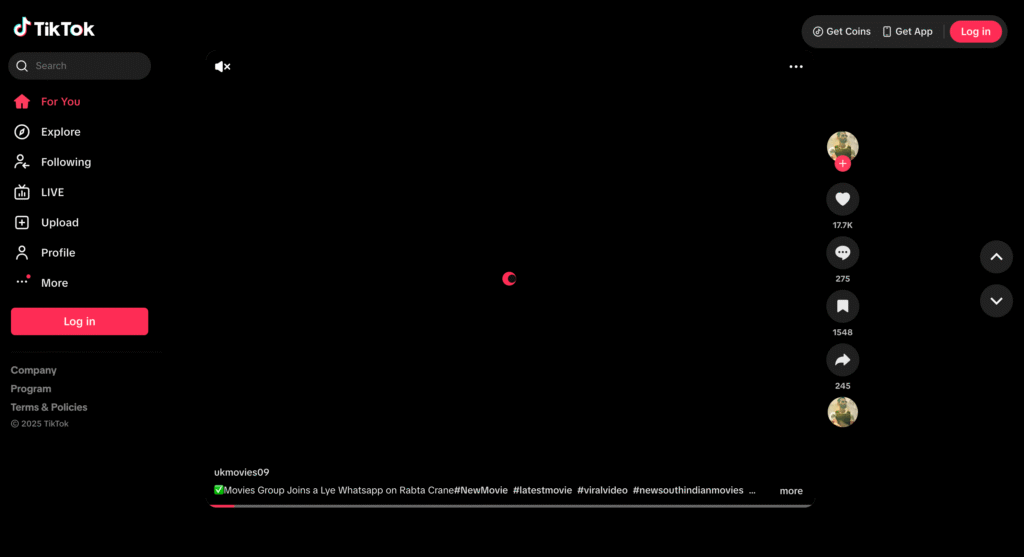
Benefits of Desktop Viewing:
– Bigger screen for details—like recipe steps.
– Use mouse to scroll easy.
– Multi-task: Watch while working.
Pro feature: Desktop lets you see profiles better. Click a creator’s name for their full page.
Watch Without Account on PC
Same as mobile—no sign-up needed for public videos. Perfect for quick checks.
Experience share: As a teacher, I use this in class. Kids watch educational TikToks on the projector without my laptop getting app-ified. Saves time!
This is “cross-device TikTok streaming,” ideal for “remote video consumption.”
If ads pop up, they’re normal—like on the app.
Way 3: Use Third-Party Websites for TikTok Playback
Sometimes, you want extras like no ads. Third-party sites help play TikTok without app, but pick safe ones!
Recommended: Sites like “ssstik.io” or “musicallydown.com” for viewing (not downloading yet).
Step-by-Step Guide:
1. Search “watch TikTok online” on Google.
2. Pick a site like “tiktokviewer.com.”
3. Paste a video link (copy from official site).
4. Hit play—video shows without app.
5. Scroll for related clips.
Why Choose This?
– Faster loads in some cases.
– Embed videos easy for blogs.
– But stick to trusted sites to avoid scams.
Without Account? Absolutely!
These sites show public videos only. No login ever.
Case study: Busy dad Mike uses this at work. He pastes links during lunch. Watches trends without distractions. “It’s like a secret window to fun,” he says.
Guidelines note: TikTok allows embeds but says “don’t misuse content.” Use for personal viewing only.
Warning: Avoid shady sites— they might have pop-ups. Always use antivirus.
Way 4: Browser Extensions for Seamless TikTok Play
For power users, add-ons make it feel like an app—without installing one!
Popular: “TikTok Enhancer” on Chrome Web Store.
Step-by-Step Guide:
1. Go to your browser’s store (e.g., Chrome Web Store).
2. Search “TikTok web enhancer.”
3. Click “Add to Chrome” and confirm.
4. Visit tiktok.com—extension kicks in!
5. Features like dark mode or speed control appear.
Perks of Extensions:
– Auto-open TikTok tabs.
– Block ads for clean watch.
– Save favorites easy.
What Does “Play TikTok Without App” Mean?
“Play TikTok without app” means opening TikTok’s world without downloading their mobile app. You skip the install button and go straight to videos using tools you already have—like your phone’s browser or a computer.
This is great for:
– Saving battery life (apps eat power!).
– Avoiding app updates that slow your phone.
– Using TikTok on shared devices without leaving traces.
Think of it as “web-based TikTok access” or “browser streaming for short-form videos.” It keeps you connected to user-generated content without native software.
Real quick story: Last week, my friend Sarah was at a family gathering. Her phone storage was full from photos. She wanted to show everyone a funny TikTok dance. Instead of stressing, she opened her browser on the spot. Boom—videos played smooth! That’s the magic we’re talking about.
TikTok Policies and Guidelines: Staying Safe While Watching Without the App:
TikTok has rules to keep everyone happy and safe. They want you to enjoy videos but follow community guidelines. Good news: Watching without the app is okay, as long as you don’t break rules.
From TikTok’s official help center, here’s what matters:
– Age Rules: You must be 13 or older to use TikTok. If you’re younger, ask a parent.
– No Bad Stuff: Don’t share or watch harmful videos—like violence or hate. TikTok removes them fast.
– Privacy: Even on the web, protect your info. Don’t click weird links in videos.
– Account Rules: If you watch without an account, you can’t like or comment. But that’s fine for just viewing!
TikTok says browser access is allowed for “discovery and entertainment.” No bans for using web versions. But remember, their terms say: “Use our services fairly.” That means no downloading videos without permission (more on that later).
Pro tip from experience: I once watched a cooking trend on browser during a road trip. No app meant no notifications popping up—pure peace!
If you violate guidelines, like spamming, your access could get limited. Always report bad videos using the web tools.
Watch TikTok Without an Account: Deep Dive:
Now, let’s zoom on “watch TikTok without an account.” It’s a big part of app-free fun!
Why skip login?
– Privacy: No data shared.
– Quick: Jump in, jump out.
– Guest mode vibes.
How it works across ways:
– On official site: Scroll “For You” feed anonymously.
– Videos play, but no saves or duets.
– Search trends without profile.
Step-by-step for anonymous watch:
1. Clear browser cookies (for extra privacy).
2. Open tiktok.com in incognito mode.
3. Enjoy! Algorithm guesses likes from views.
Limitations: Can’t go live or shop directly. But for pure watching, gold.
Pro hack: Use VPN for global trends without location tracking.
Common Challenges and Fixes When Playing Without App:
Even easy ways have bumps. Here’s help!
– Slow Loading: Use fast Wi-Fi. Close other tabs.
– No Sound: Tap volume icon—browser settings might mute by default.
– Blocked in Country: TikTok is global, but use VPN like free ones (careful with safety).
– Video Won’t Play: Update browser. Clear cache.
From experience: During a storm, my net was spotty. Switched to desktop way—better stability!
Real-World Use Cases: How People Enjoy TikTok App-Free
Let’s see it in action!
1. Parents with Kids: Watch family-friendly clips on shared TV browser. No kid accounts needed.
2. Travelers: Low-data mode on phone browser saves roaming fees.
3. Students: Quick study breaks with motivational vids on laptop.
4. Seniors: Big screen desktop for easy eyes.
Advanced Tips for Better Experience:
Want more content lik this?
– Bookmark unfreezetools.com for one-click access.
– Use keyboard shortcuts on desktop (spacebar pauses).
– Pair with screen readers for accessibility.
Frquently Asked Questions
Here are 10 common questions, answered simple!
1. Can I really play TikTok without the app?
Yes! Use browser on phone or PC. Videos play just like app.
2. Is watching TikTok without an account safe?
Super safe for public videos. No personal info shared.
3. Why does TikTok web look different from app?
It’s a lighter version. Fewer bells, but same fun core.
4. Can I download videos when watching without app?
Use tools like our https://unfreezetools.com/tiktok-video-downloader) to download any video without watermark.
5. Does TikTok ban browser users?
No! It’s official and allowed per policies.
6. How to watch live streams without app?
Go to site, search creator, tap live icon. Works guest mode.
7. What if videos don’t load on mobile browser?
Switch to desktop site in browser menu. Or clear cache.
8. Can I use this on smart TV?
Yes, via built-in browser. Cast from phone too.
9. Is there a data saver for web TikTok?
Enable low-quality in settings. Saves mobile data.
10. How to convert TikTok coins without app?
Use our tool https://unfreezetools.com/tiktok-coin-converter after earn gifts on tiktok.
Final Thoughts: Embrace App-Free TikTok Freedom:
Wow, we’ve covered a lot! From browser basics to pro extensions, playing TikTok without app opens doors. It’s simple, safe, and fun—perfect for busy lives. Remember, TikTok’s guidelines keep it positive, so follow them.
Next time you crave a giggle, skip the download. Watch without account, explore ways, and maybe link up with our tools for more magic. You’re now set to enjoy short videos anywhere!
Thanks for reading. Share your stories below—what’s your fave way?
References:
1. TikTok Community Guidelines: https://www.tiktok.com/community-guidelines
2. Browser Compatibility for TikTok: https://www.tiktok.com/legal/page/us/terms-of-service/en
3. Third-Party Viewer Safety Tips: https://www.kaspersky.com/resource-center/threats/third-party-apps